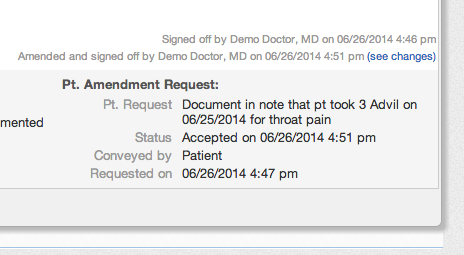
What are visit note amendment requests?
Patients may have access to your visit note documentation for their encounters and may request amendments to your documentation for various reasons (ex. the patient gave you the wrong date for an injury). Since a signed visit note has certain legal indications, providers would want to document amendment requests from patients for proper record tracking. Elation’s Patient Amendment Request feature allows providers to record requests from patients to amend visit note documentation as well as allows providers to specify whether or not they approve of the request.Documenting an amendment request from a patient
- Find the visit note that your patient has requested to amend in the Chronological Record.
- At the bottom left corner of the note click Actions >> Pt Amendment Request
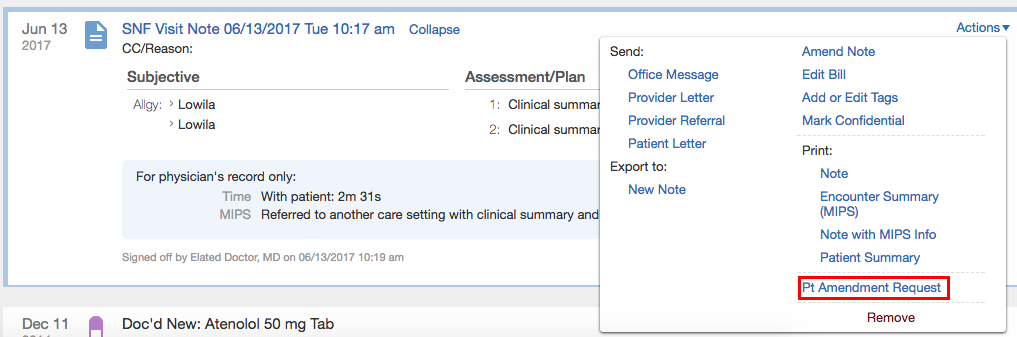
- Fill out the Patient Amendment Request form that appears
- Request= A brief description of the patient amendment request.
- Conveyed by= Who expressed the amendment request to you.
- Status= Choices are to accept or deny the request. Choosing to accept the request will automatically open the visit note for you to document the amendment.
- Requested on= Date and time of the amendment request. The form will pre-fill these fields with the current date and time.
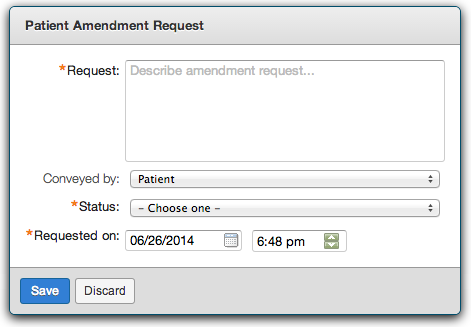
- Click Save to save the amendment request
Accepting an amendment request
If you choose to accept an amendment request, the visit note will automatically open for you to make necessary amendments. Once you finish making your amendments, click Sign Amended Visit Note to save your changes. All changes will be tracked for auditing and legal purposes.